 Luka
 NiklasAn expert from our team shows you mika liveA live demo, tailored to your companyYour questions on bookkeeping and German paperwork answered on the spot15 minutes on a video call, free and with no strings attachedLukaNiklasAn expert from our team shows you mika liveA live demo, tailored to your companyYour questions on bookkeeping and German paperwork answered on the spot15 minutes on a video call, free and with no strings attached
mika books your receipts and bank transactions. If mika needs an answer only you know, you get a todo: a question you usually answer with an upload or a click.
LukaNiklasAn expert from our team shows you mika liveA live demo, tailored to your companyYour questions on bookkeeping and German paperwork answered on the spot15 minutes on a video call, free and with no strings attachedHow a week runs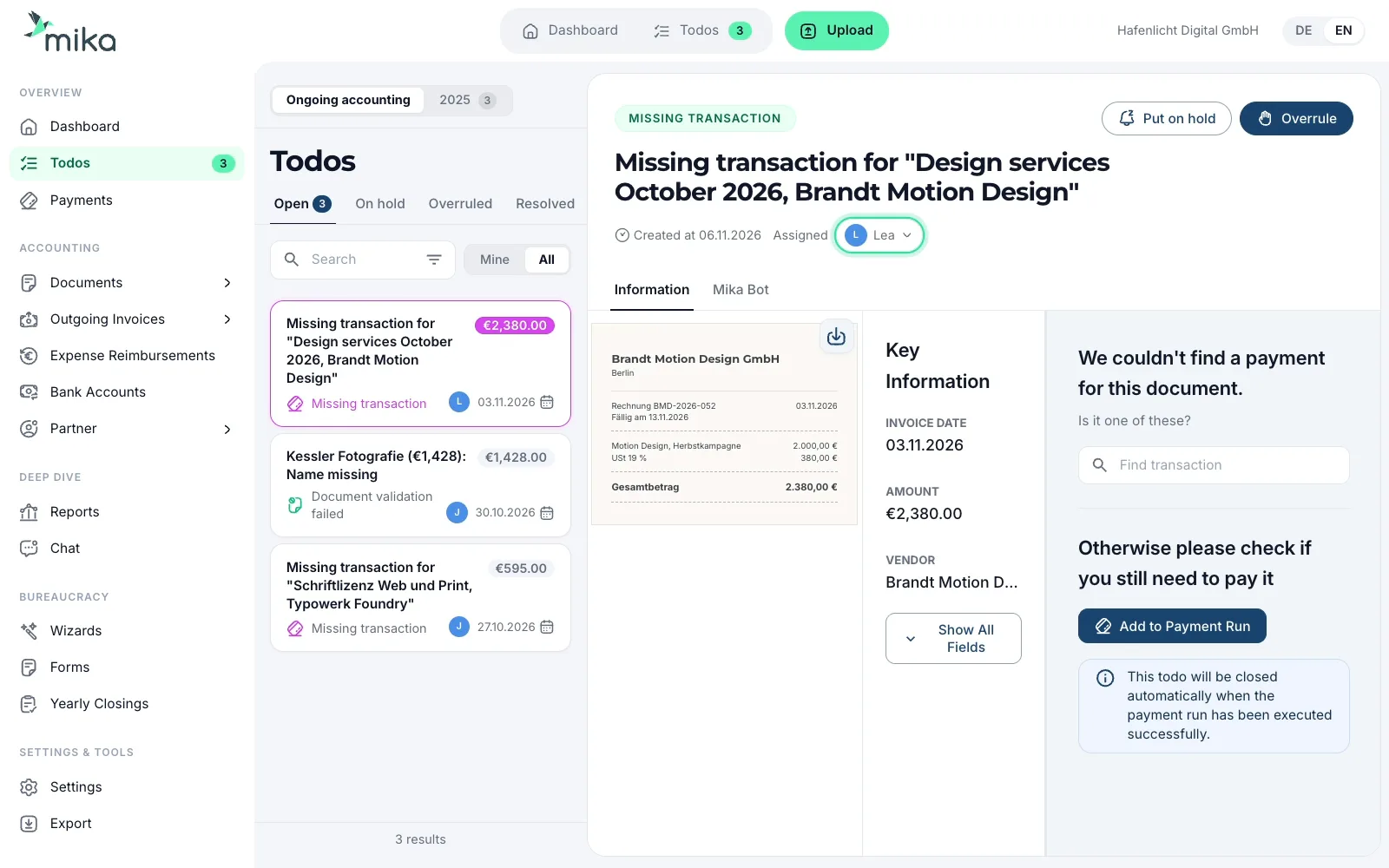
A week in your agency. Sometimes an invoice is missing, sometimes a payment, sometimes there's an error on the invoice. Plus the UStVA, the VAT pre-return, and a todo for Lea. At the end the list is empty, and that means your bookkeeping is complete.


You run an agency with twelve people. Until now, bookkeeping meant follow-up questions by email and hunting for receipts in February. In mika, 98% of all bookings run automatically. A person decides on the rest: you, your team or our accounting team.
Monday
You pay €571.20 with the company card to your hosting provider Nordhafen Cloud. The invoice only sits in your customer account with the provider. You upload the PDF, and the todo closes on its own.
Tuesday
Typowerk Foundry, a type foundry, sends an invoice for €595.00 for a font licence. It's in mika, but mika can't find a payment for it. If you've already paid, you pick the payment in the todo. If the invoice is still open, you add it straight from the todo to the payment run, the list of invoices you pay in one go.
Wednesday
Kessler Fotografie photographed your team and sends the invoice for €1,428.00. Your company name is missing from it, and without it you can't deduct the €228.00 of input VAT. You ask for a corrected invoice and upload it. If you can't get a better one, you overrule the todo.
Thursday
Our accounting team has prepared your UStVA, the monthly VAT pre-return, for October. You approve it in the todo, and it goes to the Finanzamt (tax office).
Friday
The partner agency Brandt Motion Design GmbH sends an invoice for €2,380.00, due on 13 Nov. A week before the due date, a todo comes as a reminder to pay. It goes straight to Lea, your project lead.
 A no that mika remembers. No invoice ever comes for the Kfz-Steuer (vehicle tax). You overrule the todo and tick “Remember this”. mika creates a booking rule from it, and at the next debit nobody asks you again.
 Your Jahresabschluss to approve. Like the VAT return on Thursday, your Jahresabschluss, the annual financial statements, comes as a todo as soon as it's ready. You approve it.
 Post from the Finanzamt. If a letter from the Finanzamt arrives, you upload it. Our accounting team gets back to you about it in the chat.
 Possible fraud. If an incoming invoice looks like fraud, mika pins a “Possible fraud” todo to the top of your list. You get an email about it.
In one sentence you set who gets what. For example: “All invoices from Brandt Motion Design go to Lea.” From then on, mika works out who each new todo is for and assigns it. That's why Friday's invoice was already with Lea.
LukaNiklasAn expert from our team shows you mika liveA live demo, tailored to your companyYour questions on bookkeeping and German paperwork answered on the spot15 minutes on a video call, free and with no strings attachedThe email takes you to your open todos with direct links. You choose the day yourself. Four days before every VAT return, mika reminds you of everything that has to be done by the deadline. Those todos sit at the top of your list. Your dashboard shows how much input VAT is tied up in your open todos.

Then you set a minimum amount. For smaller payments, mika doesn't ask for an invoice.

Trained accountants review all bookings before they go to the Finanzamt (tax office).

In mika every question has its own chat and its own deadline. Your inbox stays free for your clients.

Ask there “Which todos do I have open?” and reply right in the todo chat. It works the same way in ChatGPT.
Bottom line: clear to-dos instead of chaos, noticeably less effort, full control. A clear recommendation for any GmbH without its own finance department.
Jan-Mika Schmahl
Managing Director, DWMS GmbH
It's really fun to see how the to-dos are getting less and what you've achieved.
What I particularly like is that experts check everything, and they answer quickly and help whenever something is unclear.
Mika prepares your bookkeeping, your tax advisor the annual financial statements
from
/month *
LukaNiklasAn expert from our team shows you mika liveA live demo, tailored to your companyYour questions on bookkeeping and German paperwork answered on the spot15 minutes on a video call, free and with no strings attachedas an alternative to bookkeeping from a tax advisor + accounting software
Mika does your bookkeeping and annual financial statements
from
/month *
LukaNiklasAn expert from our team shows you mika liveA live demo, tailored to your companyYour questions on bookkeeping and German paperwork answered on the spot15 minutes on a video call, free and with no strings attachedas an alternative to accounting & annual financial statements from a tax advisor
Mika does your bookkeeping and provides you with a partner tax advisor for the annual financial statements
LukaNiklasAn expert from our team shows you mika liveA live demo, tailored to your companyYour questions on bookkeeping and German paperwork answered on the spot15 minutes on a video call, free and with no strings attachedas a complete alternative to your current tax advisor
* Prices vary depending on the number of expected monthly receipts and transactions. You will receive an individual offer from us.
Cost comparison
Work out with your own figures what mika costs and what a traditional tax firm costs.
A question for you, with everything you need to answer it. If a payment is missing its invoice, you see the payment and upload the invoice or tap a matching one. Every todo has its own chat.
Only when an answer is missing that mika can't find in your documents. If a missing invoice is in your Gmail, mika matches it itself. You decide from which amount mika asks for an invoice.
First mika's AI. If your question needs a person, someone from our accounting team answers in the same chat. A banner above the chat always shows you whether you're writing with the AI or with a person.
If you overrule a missing invoice, our accountants check whether the booking works without it. They only get back to you if they still need something before your next VAT return. The todo shows you what exactly happens when you overrule it.
When you overrule, tick “Remember this”, or write “This is the same every month” in the todo chat. Either way, mika creates a booking rule. You find it under Settings, Booking Rules.
Yes. In every todo you pick a person under “Assign to”, and mika names the right one. Under Settings, Todo Assignment you write in one sentence who gets what, and new todos land straight with the right person.
Once a week by email, on Friday by default, with your open todos and direct links to them. You choose the weekday yourself. Before every VAT return there's a reminder, four days before the deadline by default.
Yes, of course! With mika, you can easily invite other team members — for example your assistant, project managers, or someone from the back office. This gives you joint access to the accounting department and can easily clarify tasks such as documents or answer queries as a team.
All data on German servers, GDPR compliant, AWS infrastructure in Frankfurt. mika is built along the GoBD principles for proper bookkeeping in electronic form. Authentication with two-factor (a TOTP authenticator app).
LukaNiklasAn expert from our team shows you mika liveA live demo, tailored to your companyYour questions on bookkeeping and German paperwork answered on the spot15 minutes on a video call, free and with no strings attached