
Franchise with many locations
A franchise has built one cockpit across all its locations. Through MCP it pulls each location's numbers from mika.
- mika MCP
- BWA, Bilanz, UStVA, receipts, transactions
- One cockpit across all locations
 Luka
 NiklasAn expert from our team shows you mika liveA live demo, tailored to your companyYour questions on bookkeeping and German paperwork answered on the spot15 minutes on a video call, free and with no strings attached
mika books your receipts. Connect mika to ChatGPT and Claude once through MCP, a connection for AI assistants, and your assistant can read everything you see in mika and do what you allow. Ask it about your BWA, for example, or have it write an invoice. What you make of it is up to you.
LukaNiklasAn expert from our team shows you mika liveA live demo, tailored to your companyYour questions on bookkeeping and German paperwork answered on the spot15 minutes on a video call, free and with no strings attachedHow to connect mika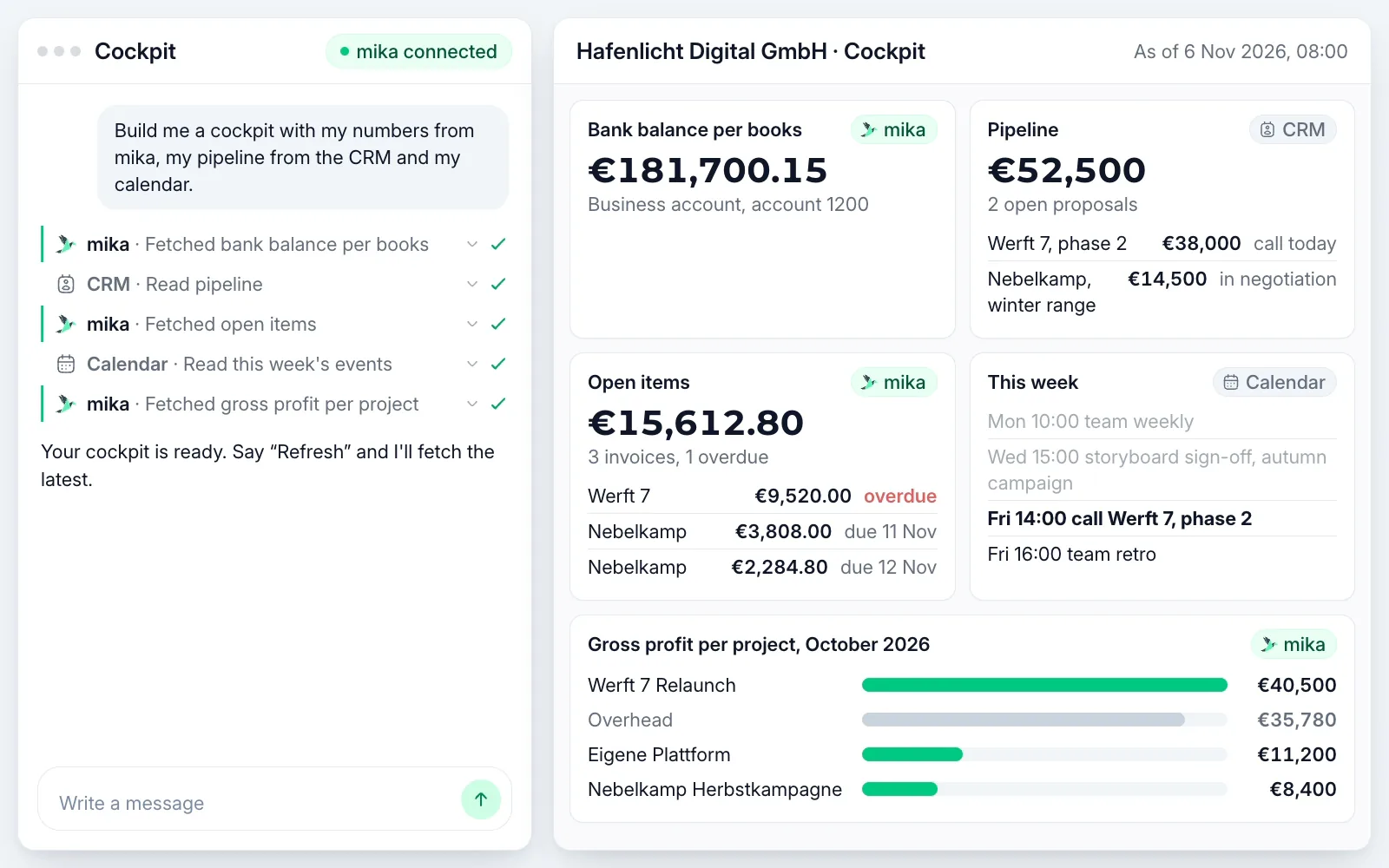
For example, a cockpit, if you ask for one: your numbers from mika next to your pipeline and your calendar.


You run an agency and handle the finances yourself. Until now, every question about your numbers meant exporting them and rebuilding them in Excel. Now you ask your assistant. Here are four things from one week. Your week looks different, and so do your questions.
Monday
On Monday you have your assistant build you a briefing for the week. It puts the numbers from mika next to your calendar and CRM. You see that your October VAT return has to go out by 10 Nov and which big invoice falls due next. You also see what stays on the account after that, and the assistant's estimate of where Q4 will land.
Tuesday
On Tuesday you ask for a quarterly update for your investors. Your assistant takes Q2 and Q3 from your BWA, the German monthly management report, and attaches the BWA 2026 as a PDF.
Thursday
On Thursday you have your assistant write an invoice. You haven't yet billed your client Nebelkamp Kaffeerösterei GmbH for the social media edits for the autumn campaign. Your assistant takes the hourly rate from your last invoice and shows you the draft. After your OK the invoice goes out, with an e-invoice and a QR code.
Friday
On Friday you want to see where your agency stands, and ask for a cockpit built the way you want it. Your assistant builds it from mika, CRM and calendar, with Thursday's invoice already in it. Say “Refresh”, and it fetches the latest.
16 examples you can type into your assistant just like this.
 Monday morning
Your appointments and deadlines, plus what stays on your account in two weeks.
Your assistant goes from the figure in the BWA down to the single receipt.
Both months from your BWA, as a table in the chat.
The estimated amount of your next UStVA, the monthly or quarterly VAT pre-return, and the day it's due.
 Month end
Your unpaid invoices per client, with a reminder text for each.
Your assistant takes the matching invoices from the folder, uploads them to mika and matches them to the payments.
Writes, after you confirmAfter your OK it goes out, with an e-invoice and a QR code.
Writes, after you confirmThe invoices that are due go into the payment run, your batch transfer. You release it yourself.
Writes, after you confirm Investor call and bank
Your assistant puts Q3 next to Q2 and writes the text for your investors.
Your GuV, the German P&L, with a prior-year column, as a PDF to forward.
The BWA for just the campaign's cost centre, with revenue and costs side by side.
 Annual accounts
Your assistant tells you which documents are missing. Give it the link to one of them, and it uploads it after your OK.
Writes, after you confirmYour assistant enters details such as shareholders and managing directors in mika after your OK.
Writes, after you confirm Your own tool
One sentence, and your cockpit shows the latest figures.
You set it up in your assistant as a recurring task. Every Monday it checks your unpaid invoices.
Your assistant creates them in mika as drafts. You send them yourself.
Writes, after you confirmI also use the MCP and API connection to pull my accounting data directly for analyses, without having to export and prepare it first.
Through MCP, a connection for AI assistants, ChatGPT and Claude get your numbers straight from mika.
Copy the address
It's right here, and in mika under Settings, Integrations.
Paste it into ChatGPT or Claude
Add it there as a connector in the settings.
Sign in with mika
One login, and your assistant is connected.
https://mcp.app.getmika.de/mcpLukaNiklasAn expert from our team shows you mika liveA live demo, tailored to your companyYour questions on bookkeeping and German paperwork answered on the spot15 minutes on a video call, free and with no strings attachedA franchise has built one cockpit across all its locations. Through MCP it pulls each location's numbers from mika.
A UG, the mini GmbH with less share capital, has built its own cost dashboard. Every number in it comes straight from mika, with no export and no retyping.
You connect Claude Code and Codex, the coding assistants from Anthropic and OpenAI, through the same address. Then they write you the scripts and dashboards you have in mind, with your numbers from mika.
 Reading from the first login. Every company starts in read mode. We switch on writing for your company whenever you like.
 Writes only after you confirm. Your assistant asks before it changes anything. If an invoice goes to your client, you confirm the recipient and the text first.
 Every change with a reason. No change goes through without a reason from your assistant. The audit log shows each one with its reason, time and assistant.Accountants review every booking. Trained accountants review your bookings. If your assistant creates a booking rule, a fixed rule for how mika books certain receipts, it only applies once you activate it.
 Protection against hidden commands in receipts. If someone hides an instruction in a receipt, mika passes it on as marked data and tells your assistant not to follow it.
 Your assistant can do what you can do. It works with your login and your permissions. Under Connected Apps you disconnect it instantly.
What I particularly like is that experts check everything, and they answer quickly and help whenever something is unclear.
Bottom line: clear to-dos instead of chaos, noticeably less effort, full control. A clear recommendation for any GmbH without its own finance department.
Galina
Office Manager, MEM Energy & Technical Solutions GmbH
Translated from German
Quick and easy, very thorough, much less complicated than with previous tax advisors.
You pay for your bookkeeping. The connection for ChatGPT and Claude comes with it.
Mika prepares your bookkeeping, your tax advisor the annual financial statements
from
/month *
LukaNiklasAn expert from our team shows you mika liveA live demo, tailored to your companyYour questions on bookkeeping and German paperwork answered on the spot15 minutes on a video call, free and with no strings attachedas an alternative to bookkeeping from a tax advisor + accounting software
Mika does your bookkeeping and annual financial statements
from
/month *
LukaNiklasAn expert from our team shows you mika liveA live demo, tailored to your companyYour questions on bookkeeping and German paperwork answered on the spot15 minutes on a video call, free and with no strings attachedas an alternative to accounting & annual financial statements from a tax advisor
Mika does your bookkeeping and provides you with a partner tax advisor for the annual financial statements
LukaNiklasAn expert from our team shows you mika liveA live demo, tailored to your companyYour questions on bookkeeping and German paperwork answered on the spot15 minutes on a video call, free and with no strings attachedas a complete alternative to your current tax advisor
* Prices vary depending on the number of expected monthly receipts and transactions. You will receive an individual offer from us.
Cost comparison
Work out with your own figures what mika costs and what a traditional tax firm costs.
MCP stands for Model Context Protocol, a connection through which AI assistants like ChatGPT and Claude work with your bookkeeping in mika. You copy an address, paste it into your assistant and sign in with your mika account. You don't need to write any code.
Your bookkeeping stays in mika. Your assistant gets the answers to your questions and processes them under its provider's rules, OpenAI's for ChatGPT, Anthropic's for Claude. Whether your provider may use your chats for training is something you set in the privacy settings of ChatGPT or Claude. It works with your login and sees only what you can see in mika.
With ChatGPT and Claude. Claude Code and Codex sign in with your mika account the same way. For your own scripts and other tools, you create an API key.
Yes. Every company starts in read mode, and we switch on writing for your company whenever you like. Then your assistant creates invoices, uploads receipts, matches them to payments, prepares the payment run and keeps your cost centres up to date. Writes only after you confirm: your assistant asks before it changes anything.
Your assistant asks before it changes anything. If an invoice goes to your client, you confirm the recipient and the text first. No change goes through without a reason from your assistant, and the audit log shows each one with its reason, time and assistant. Booking rules from your assistant wait until you activate them.
In mika, copy the address https://mcp.app.getmika.de/mcp under Settings, Integrations. In ChatGPT or Claude, add it as a connector and sign in with your mika account. You don't need an API key for it.
The mika Agent is the chat in the mika app, there without any setup. With MCP you bring your bookkeeping into ChatGPT and Claude. There your assistant puts your numbers next to your other sources, say your calendar and CRM.
Yes. Under Settings, Integrations, API Keys you create a key for one company, or one for all your companies. With it you connect your own scripts, dashboards and tools, also through Zapier.
Yes, in every plan, for reading and for writing. You pay for your bookkeeping, and you connect ChatGPT and Claude at no extra cost.
LukaNiklasAn expert from our team shows you mika liveA live demo, tailored to your companyYour questions on bookkeeping and German paperwork answered on the spot15 minutes on a video call, free and with no strings attached