 Luka
 NiklasAn expert from our team shows you mika liveA live demo, tailored to your companyYour questions on bookkeeping and German paperwork answered on the spot15 minutes on a video call, free and with no strings attachedLukaNiklasAn expert from our team shows you mika liveA live demo, tailored to your companyYour questions on bookkeeping and German paperwork answered on the spot15 minutes on a video call, free and with no strings attached
In your BWA, the German monthly management report, you see live what each project costs and what's left over. You describe each cost centre in one sentence, and mika assigns every line item as it books, even by a note you wrote by hand.
LukaNiklasAn expert from our team shows you mika liveA live demo, tailored to your companyYour questions on bookkeeping and German paperwork answered on the spot15 minutes on a video call, free and with no strings attachedHow it works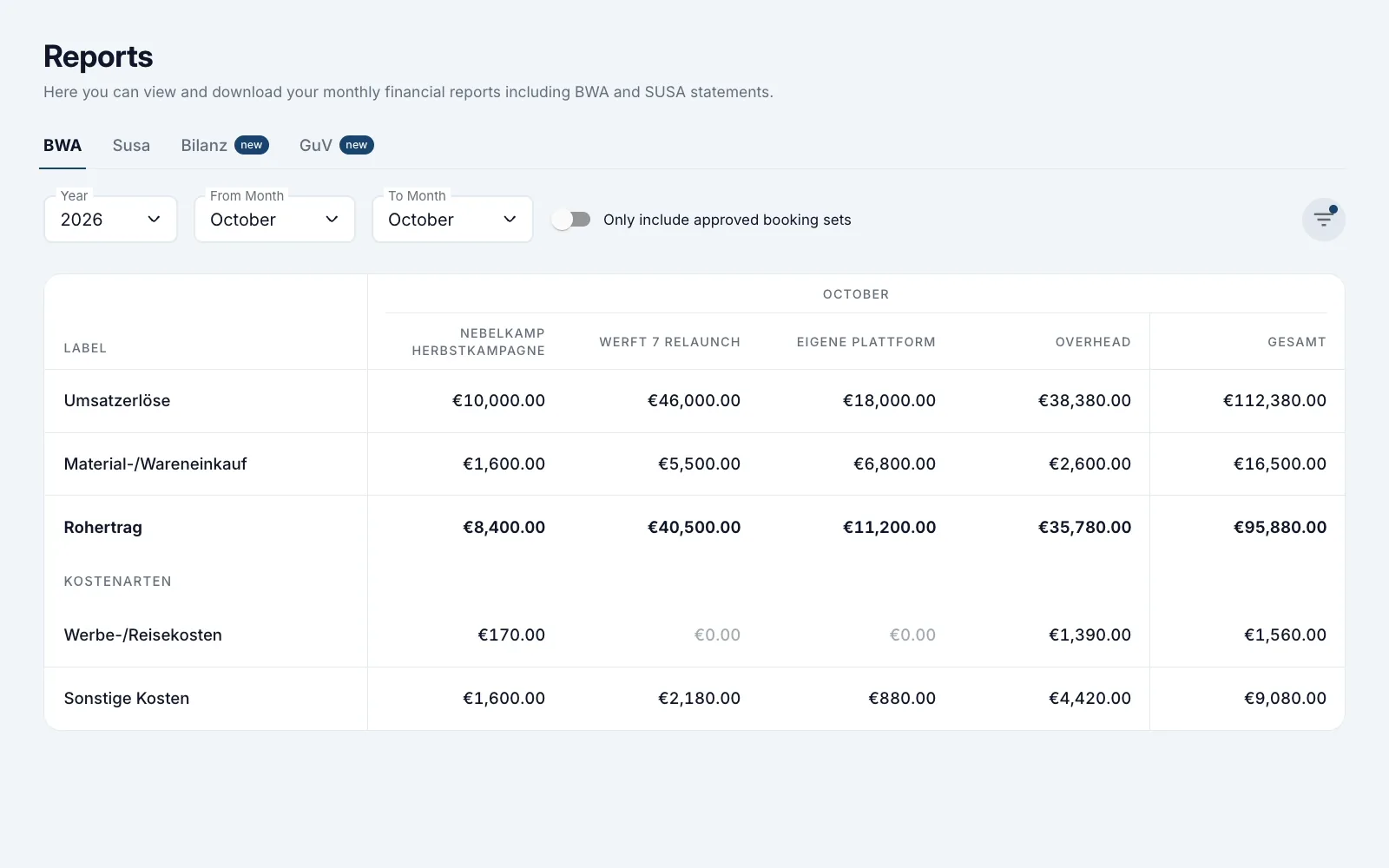
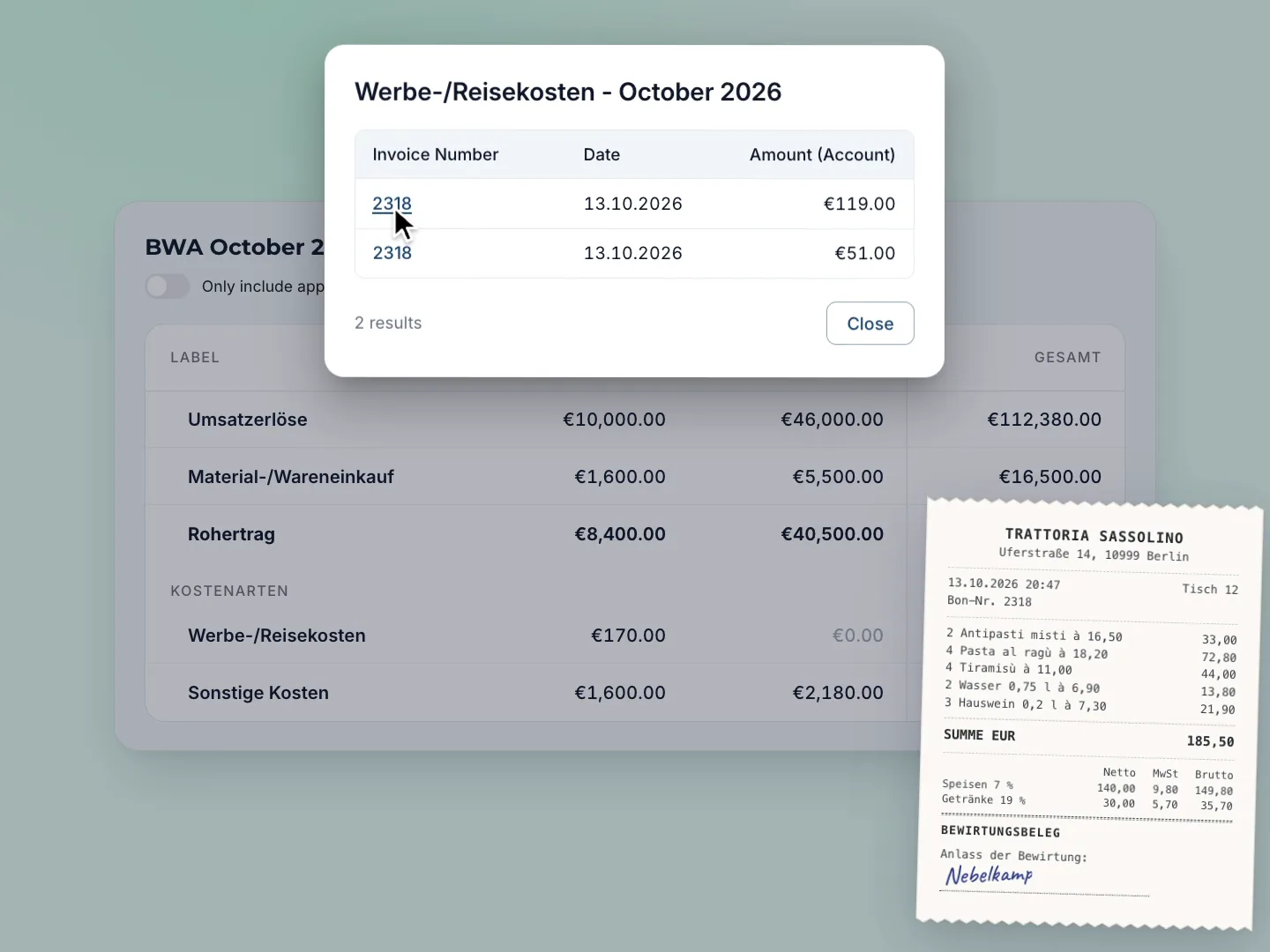
You write “Nebelkamp”, your client's name, on the receipt. In the BWA the amount then shows up in the Nebelkamp Herbstkampagne column.
Never worked with cost centres?
A cost centre is a drawer in your bookkeeping, for a project or an area of your company. Usually you answer questions like these with an Excel export and a spare afternoon. For each of these questions you create a cost centre in mika, and in your BWA, your company's monthly report, it gets its own column.
Already know cost centres?
You map both cost centres and cost objects, and in the DATEV export they sit in KOST1 and KOST2 (DATEV is the software German tax firms work in). Nobody allocates by hand anymore.


The way you'd explain it to a new colleague. For your client project Nebelkamp Herbstkampagne (the autumn campaign) you write: “Everything for our client Nebelkamp's autumn campaign: motion design, music, fonts, dinners with the client, the invoice often says ‘Nebelkamp’ or ‘Herbstkampagne’.” That exact sentence goes into the AI Description field in mika, and the AI reads it with every receipt.
Your partner agency Brandt Motion Design sends you an invoice for €2,380.00 gross with two line items. mika reads each item on its own and gives it two cost centres, one for the project and one for the area. Project and area are two dimensions, two ways of sorting your numbers. So the motion design and the music licence both land in the Nebelkamp Herbstkampagne project and in the Design area.
After dinner with the Nebelkamp team, you write “Nebelkamp” on the receipt from the restaurant Trattoria Sassolino and upload the photo. The AI reads the whole receipt, your note included, and assigns it to the Nebelkamp Herbstkampagne project.
You open your BWA and select your cost centres. Each one gets its own column, for every month: Umsatzerlöse (revenue), Material-/Wareneinkauf (external services), Rohertrag (gross profit) and the cost lines below. For Nebelkamp, €10,000 in revenue stands against €1,600 for the motion design, so €8,400 gross profit. Take off the music licence, the font licence and the dinner, and €6,630 is left. You know that while it's still October.
In mika, cost centres are called Tags. In Settings, under Tags, you first create a dimension, say Project or Area. Your cost centres go inside it, each with its own sentence. For your client Werft 7 GmbH, the Werft 7 Relaunch project reads: “The website relaunch for Werft 7, including everything from Hamburg between 12 and 15 October, shooting days on site.” Then the AI also assigns receipts without a note, by date and place. Other mika customers sort by location, by grant-funded project or by KSK liability, the levy for the German artists' social insurance.
Your outgoing invoices get their cost centre the same way, whether uploaded or written in mika. Your €3,200.00 invoice to Nebelkamp lands in the Nebelkamp Herbstkampagne project and, in the second dimension, in the Design area. In the BWA each area then shows its revenue next to Material-/Wareneinkauf, its external services and materials, month by month, and below that the Rohertrag (gross profit): revenue minus what the team spends on freelancers. A cost centre with its own revenue and its own costs is called a profit centre, so Design and Development are two of them here.
You click a figure in the Nebelkamp Herbstkampagne column and see only that cost centre's bookings, here the dinner with Nebelkamp, €185.50 gross, so €170 net. You open the receipt itself through its invoice number, your note included.
 LukaNiklasAn expert from our team shows you mika liveA live demo, tailored to your companyYour questions on bookkeeping and German paperwork answered on the spot15 minutes on a video call, free and with no strings attached
 The AI gets one wrong? Then you change the cost centre in two clicks, for one line item or the whole receipt, and the BWA follows right away. If it should always be that way, you create a booking rule.
 My tax advisor works with DATEV. In the DATEV export, one dimension, say Area, lands in KOST1 as the Kostenstelle (cost centre), and a second one, say Project, in KOST2 as the Kostenträger (cost object). For that you set the DATEV Cost Center Number on the dimension. Your tax advisor gets your cost centres straight in the export and enters nothing again.
 My team doesn't know the cost centres. They don't need to. Your team's expenses run through the same AI and land on their cost centre. If a receipt is unclear, you get the to-do “Specify Tags” if you want it, in the mika app on your phone too.
 Our company will look different next year. Then you rename cost centres or create new ones. Last year's figures keep their cost centres.
A clear recommendation for any GmbH without its own finance department.
For me, that is the real advantage over classic accounting software: the data is not locked inside the tool, it can be processed further.
Galina
Office Manager, MEM Energy & Technical Solutions GmbH
Translated from German
Quick and easy, very thorough, much less complicated than with previous tax advisors.
Thank God there is mika. For about a year now our entire financial accounting has run through it, without me as a founder having to put much time into it.
BWA and SuSa (trial balance) with your cost centres side by side are included too, at no extra cost.
Mika prepares your bookkeeping, your tax advisor the annual financial statements
from
/month *
LukaNiklasAn expert from our team shows you mika liveA live demo, tailored to your companyYour questions on bookkeeping and German paperwork answered on the spot15 minutes on a video call, free and with no strings attachedas an alternative to bookkeeping from a tax advisor + accounting software
Mika does your bookkeeping and annual financial statements
from
/month *
LukaNiklasAn expert from our team shows you mika liveA live demo, tailored to your companyYour questions on bookkeeping and German paperwork answered on the spot15 minutes on a video call, free and with no strings attachedas an alternative to accounting & annual financial statements from a tax advisor
Mika does your bookkeeping and provides you with a partner tax advisor for the annual financial statements
LukaNiklasAn expert from our team shows you mika liveA live demo, tailored to your companyYour questions on bookkeeping and German paperwork answered on the spot15 minutes on a video call, free and with no strings attachedas a complete alternative to your current tax advisor
* Prices vary depending on the number of expected monthly receipts and transactions. You will receive an individual offer from us.
Cost comparison
Work out with your own figures what mika costs and what a traditional tax firm costs.
In Settings, under Tags, which is what cost centres are called in the app. You create a tag dimension, for example Project, and inside it your cost centres, say Nebelkamp Herbstkampagne for your client Nebelkamp and Overhead for everything else. Each one gets an AI Description, one sentence in your own words. With the Selection Method you set for each dimension what happens when the AI is unsure. After five minutes everything is set up.
No. In the in-app chat you tell the mika Agent, our chat assistant, about your current and planned projects, and it suggests dimensions and cost centres, each with its AI Description. If you'd rather talk to a person, our support team sets up your cost centres with you, based on your current and upcoming projects.
If you want to know what each project or area costs and brings in, yes. If your company does just one thing, the BWA for the whole company is enough.
You change it in two clicks, for a single line item or for the whole receipt, and your BWA shows the change right away. If a supplier or a period should always land on the same cost centre, you create a booking rule. If the AI is unsure, it leaves the field empty or sends you the to-do “Specify Tags”, depending on what you have set.
Yes. If you set a tag dimension, for example Area, to DATEV Cost Center Number 1, it appears in the KOST1 field, the Kostenstelle (cost centre). You set a second one, say Project, to 2. That one lands in KOST2, which DATEV calls the Kostenträger (cost object). Each cost centre has its own DATEV ID.
A cost centre collects costs, a profit centre collects revenue as well. In mika your outgoing invoices get their cost centre just like your incoming invoices. That's why the BWA shows you revenue and costs side by side for each cost centre. So every cost centre is also a profit centre, and you set up nothing extra for it.
Yes, down to each single line item. The AI assigns every line item on its own, one cost centre per dimension. The invoice from your partner agency Brandt Motion Design then sits in the Nebelkamp Herbstkampagne project and in the Design area at the same time, and on an invoice with two line items each one can land somewhere else.
Yes. The AI sees the photo or PDF of the whole receipt, your note included. If you write your client's name, say “Nebelkamp”, on a restaurant receipt or “Goes to Nebelkamp” on an invoice that came by post, it assigns the receipt to its cost centre accordingly.
Yes, at any time. You create new cost centres whenever your company changes, and rename old ones or retire them. The AI assigns new receipts as soon as the cost centre exists. Receipts that are already booked get their cost centre from you in two clicks, for one line item or for the whole receipt. Last year's bookings keep their cost centres.
For you, it is a single email to your current tax advisory firm. mika handles everything else: we coordinate directly with the firm, request the DATEV export and take over your bookkeeping, including the past months. The switch is usually complete within two to three weeks. How fast it goes depends mainly on when your current firm sends the data. You can switch at any time, even in the middle of a month, quarter or financial year.
As up to date as your bookings. mika books your receipts and bank transactions as soon as they arrive, not at month end. Bank transactions come in as soon as your bank reports them, at the latest with the daily sync. mika recalculates the BWA every time you open it.
All data on German servers, GDPR compliant, AWS infrastructure in Frankfurt. mika is built along the GoBD principles for proper bookkeeping in electronic form. Authentication with two-factor (a TOTP authenticator app).
LukaNiklasAn expert from our team shows you mika liveA live demo, tailored to your companyYour questions on bookkeeping and German paperwork answered on the spot15 minutes on a video call, free and with no strings attached