 Luka
 NiklasAn expert from our team shows you mika liveA live demo, tailored to your companyYour questions on bookkeeping and German paperwork answered on the spot15 minutes on a video call, free and with no strings attachedLukaNiklasAn expert from our team shows you mika liveA live demo, tailored to your companyYour questions on bookkeeping and German paperwork answered on the spot15 minutes on a video call, free and with no strings attached
You connect your mailbox once. From then on, mika finds your invoices every night and matches them to the payments, without you searching. The first time, if you want, it also brings in the missing receipts for your Jahresabschluss, the annual financial statements.
LukaNiklasAn expert from our team shows you mika liveA live demo, tailored to your companyYour questions on bookkeeping and German paperwork answered on the spot15 minutes on a video call, free and with no strings attachedHow it works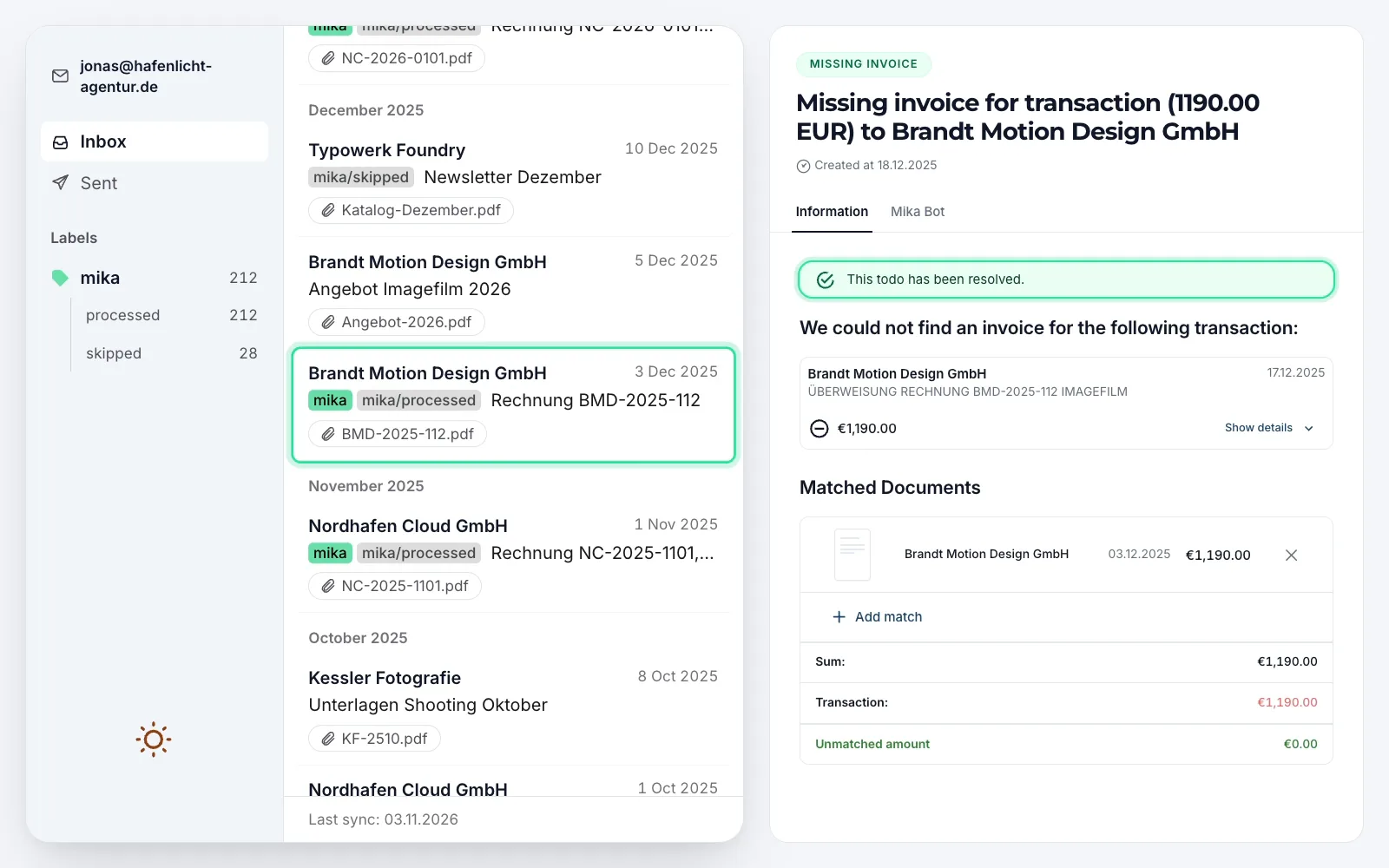
The missing invoice was in your mailbox. Overnight it's booked, and nobody asks you about it any more.


Until now, bookkeeping meant searching your mailbox in January for December's invoice. With mika it works like this, shown with an invoice from your supplier Brandt Motion Design GmbH.
Found
Invoice BMD-2025-112 for €1,190.00 has been in your Gmail since December, and it's still missing for your 2025 Jahresabschluss. mika looks at the emails with an attachment whose subject or sender points to an invoice, and gives the invoice the green “mika” label. mika also looks at the newsletter with a PDF, finds no invoice and marks it “skipped”. The quote doesn't point to an invoice and stays without a label.
Read and validated
Supplier, invoice number, date, tax and total: mika reads it all and validates that the required details are correct. Then mika books the invoice.
Matched
On 17 Dec 2025 the €1,190.00 transfer to Brandt Motion Design left your business account. Until now it showed “Receipt missing”. Now the invoice is attached to it.
Done
For the transfer to Brandt Motion Design, mika had a “Missing invoice” todo for you, an open question waiting for your answer. Now it's resolved without you doing anything. That happens to every invoice mika finds in your Gmail.
Connect Gmail
In mika, click “Connect mailbox” and “Connect with Google”. You grant access on Google's own page, for your company address in Google Workspace too.
Choose a start date
You decide from when the first sync fetches emails, last year included. Beforehand you see roughly how many emails mika will fetch.
Start first sync
One click, and mika fetches the matching emails from your start date. After that, mika checks again every night on its own.
If you let the first sync start last year, the missing receipts for your Jahresabschluss come along right away. Every invoice mika finds closes its “Missing invoice” todo. For the rest the todo stays open, and you upload the invoice there.
As soon as your mailbox is connected, you'll find the green label “mika” in Gmail, with “processed” and “skipped” beneath it. Every email that looked like an invoice then carries a label from mika. One click on “mika”, and you see everything mika took.
Connect as many mailboxes as you need, say yours and buchhaltung@, your accounting address. The receipts land in one list. If the invoice from your hosting provider Nordhafen Cloud for €571.20 arrives in the evening, by morning it's attached to its debit. If it's urgent, you click “Sync now”.
 mika only stores what's an invoice. From Gmail, mika only requests emails with an attachment whose subject or sender points to an invoice, or that you labelled “mika” yourself. If the AI recognises an invoice, a receipt or a credit note in one, mika stores the email with its attachment. All other emails stay where they are.
 Your password stays with Google. You grant access on Google's own page. mika stores this permission encrypted.
 The AI works in the EU. The AI that sorts your invoice emails runs on servers in the EU.
 You can disconnect at any time. One click on “Disconnect”. Your receipts stay in mika, and mika removes the labels if you want.
If an invoice arrives twice, say from Gmail and forwarded, mika makes one receipt out of it.
 Upload Drag PDFs, photos from your phone or whole ZIP files into mika.
 Your receipts address Forward invoices to your address at mika, or give it to your suppliers.
 Google Drive Whatever you put in the shared folder becomes a receipt.LukaNiklasAn expert from our team shows you mika liveA live demo, tailored to your companyYour questions on bookkeeping and German paperwork answered on the spot15 minutes on a video call, free and with no strings attached
 The AI books something wrong. Trained accountants review all bookings before they go to the Finanzamt (tax office).
 The connection to Google drops. Then you get a todo and an email. With “Reconnect Gmail mailbox” you grant access again, and it carries on.
Thanks to this automation, my day-to-day admin effort tends towards zero.
Bookkeeping can be this simple. Just forward every invoice to Mika and spend five minutes once a week checking that everything is right.
Thank God there is mika. For about a year now our entire financial accounting has run through it, without me as a founder having to put much time into it.
Jan-Mika Schmahl
Managing Director, DWMS GmbH
It's really fun to see how the to-dos are getting less and what you've achieved.
Mika prepares your bookkeeping, your tax advisor the annual financial statements
from
/month *
LukaNiklasAn expert from our team shows you mika liveA live demo, tailored to your companyYour questions on bookkeeping and German paperwork answered on the spot15 minutes on a video call, free and with no strings attachedas an alternative to bookkeeping from a tax advisor + accounting software
Mika does your bookkeeping and annual financial statements
from
/month *
LukaNiklasAn expert from our team shows you mika liveA live demo, tailored to your companyYour questions on bookkeeping and German paperwork answered on the spot15 minutes on a video call, free and with no strings attachedas an alternative to accounting & annual financial statements from a tax advisor
Mika does your bookkeeping and provides you with a partner tax advisor for the annual financial statements
LukaNiklasAn expert from our team shows you mika liveA live demo, tailored to your companyYour questions on bookkeeping and German paperwork answered on the spot15 minutes on a video call, free and with no strings attachedas a complete alternative to your current tax advisor
* Prices vary depending on the number of expected monthly receipts and transactions. You will receive an individual offer from us.
Cost comparison
Work out with your own figures what mika costs and what a traditional tax firm costs.
From Gmail, mika only requests emails with an attachment whose subject or sender points to an invoice, or that you labelled “mika” yourself. Of those, mika only stores the ones the AI recognises as an invoice, a receipt or a credit note. All other emails stay where they are. mika stores the permission for your mailbox encrypted, and the AI that sorts your invoice emails runs on servers in the EU.
Yes. You connect your company's mailbox in Google Workspace the same way as a Gmail address.
Yes. On the first sync you choose from when mika fetches emails, last year included. That way missing receipts for your Jahresabschluss (annual financial statements) come with the first sync, and every invoice that mika matches to its payment closes its “Missing invoice” todo.
Then carry on as before. If the same invoice arrives from Gmail and through your receipts address, mika makes one receipt and one booking out of it.
Emails with an attachment that look like invoices, for example with “Rechnung”, “Invoice” or “Beleg” in the subject (Rechnung and Beleg are German for invoice and receipt). The AI reads the sender, subject, text and attachment names and decides whether the email brings an invoice, a receipt or a credit note. It leaves newsletters, contracts and payslips alone, even with a PDF.
By the green label “mika” and the labels “processed” and “skipped” beneath it, which you find in Gmail as soon as your mailbox is connected. Every email that mika turned into a receipt carries “mika” and “processed”. Emails that mika looked at and left carry “skipped”. If an invoice has an unusual subject, give it the “mika” label yourself. mika will then look at it on the next sync.
Yes. Connect as many mailboxes to mika as you need, say yours and buchhaltung@, your accounting address. The receipts all land in the same list.
In mika, under Settings, Integrations, Gmail, you click “Connect mailbox” and then “Connect with Google”. On Google's page you grant access. Back in mika you choose from when the first sync fetches emails, and you start it. After that, the sync runs every night.
One click on “Disconnect” ends the access at Google. Receipts that were already imported stay in mika. If you want, mika also removes its labels from your mailbox.
LukaNiklasAn expert from our team shows you mika liveA live demo, tailored to your companyYour questions on bookkeeping and German paperwork answered on the spot15 minutes on a video call, free and with no strings attached